category preview

Laptop USB Port

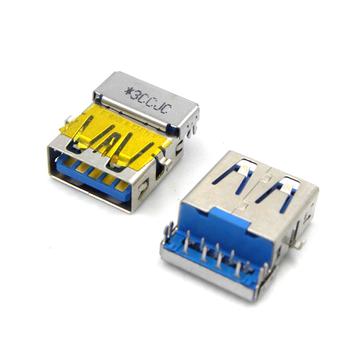
USB Universal Serial Bus port is a standard interface used to connect various devices to computers and Laptop. A malfunctioning USB port on a laptop including physical damage, software glitches, or problems with the USB device itself. Must be replace Laptop USB port.
Frequently Asked Questions

How do I fix a laptop USB port that is not working?
1. Clean the port with compressed air. 2. Restart your laptop and update USB drivers. 3. Try different devices and check power settings. 4. Reset BIOS if needed. 5. If issues persist, the port might need professional repair.
What are the different types of USB ports on laptops?
USB-A: Standard rectangular port. USB-C: Small, reversible, supports fast data and charging. USB 3.0/3.1: High-speed ports (up to 10 Gbps). Thunderbolt: High-speed data, video, and power via USB-C. USB 2.0: Older, slower version.
Can I replace a broken laptop USB port myself?
Replacing a USB port is complex and requires proper tools (soldering, screwdrivers). If unsure, it’s best to seek professional repair to avoid further damage.
Why is my laptop USB port charging but not transferring data?
Update USB drivers and check power settings. Ensure the cable supports both charging and data. Test with other devices or clean the port.
How can I increase the number of USB ports on my laptop?
Use a USB hub or USB-C hub for additional ports. A docking station offers more ports and other connections like HDMI.
WhatsApp ContactTelegram ContactPhone ContactEmail Contact